
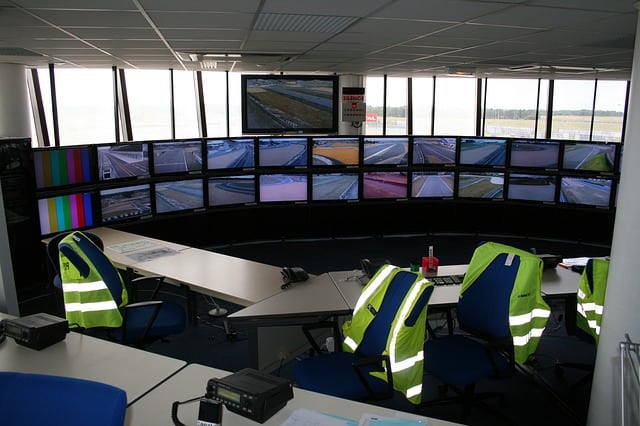
Control rooms offer increased uptime, better speed, safer employees and customers, and improved coordination in high-stakes environments. In this article, we’ll teach you everything you need to know, including the types and functions of control rooms, along with design basics, core components, and frequently made mistakes.
What is a Control Room?
A control room is a centralized workspace where operators monitor systems and coordinate real-time operations.
Teams use control rooms to manage critical processes, respond to alerts, and maintain safe, reliable performance across complex environments.
Whether it’s a control room for a police station, refinery, or other process-intensive company or organization, the control room is where the magic happens. Also known as an operations center or operations room, they’re used in industries ranging from oil and gas pipelines to prisons to air traffic control.
What Does a Control Room Do?
A control room allows teams to monitor systems, respond to issues, and coordinate operations in real time. It brings people, data, and tools together in one place so decisions can happen quickly and with context.
At a basic level, a control room supports:
- Real-time monitoring of systems, equipment, or environments
- Alert response and escalation when conditions change
- Communication and coordination between teams and the field
- Documentation and logging for compliance and review
These functions help organizations resolve issues faster and reduce errors. They also support safer operations in high-stakes environments.
Who Works in a Control Room?
The exact roles can vary, based on the industry. The following list incorporates all industries, though:
- Operators
- Technicians
- Supervisors
Control Room Types
Control room designs and layouts for different industries have different needs. Here, we have a list of several common applications for control room layouts, as well as the considerations you might need to take when building yours.
Public Safety/Dispatch
Public safety, including police and emergency response, requires a control room. For instance, police station control rooms are the command center for the police force. That means being able to communicate effectively with patrolmen in the field is paramount.
Along with the space needed for networking equipment and telephone or radio equipment, police stations and other public safety needs have a particular need for monitors for surveillance. Choosing the right control room furniture for a public safety operations room means finding the right balance between accessibility and efficient ease of movement there are times even the control room staff might need to be called into the field.
Security/Surveillance
Security and surveillance control rooms are where monitoring of various industrial and technical processes takes place. Sometimes this will require storing large pieces of equipment—oversized servers, computers, and monitors that can graphically represent the various processes taking place in your facility.
Running a cyber security business, or some other technology-intensive industry, will present a need for an efficient and storage-heavy process control room. Focus on the scarcity of fixtures and consolidate groups of people who work together, especially in terms of staff who work on different parts of the same process when designing your process control room.
Industrial
Refineries, whether nuclear or otherwise, as well as large industrial complexes—bring their own challenges when designing control rooms.
Many of these types of industrial control rooms need large equipment, ample desk space, and space for surveillance and monitoring devices. The key to designing a power plant or industrial operations room is whether or not you need to have everything in one room, or if several spaces can be used for various aspects of controlling conditions and crisis situations throughout the facility.
IT Operations
Providing the IT department with a network operations center (NOC) makes it possible for them to offer decision support, real-time monitoring, emergency responses, and process management.
The role of IT professionals working in a NOC also includes providing strong communication and ensuring efficiency. Furthermore, they’re responsible for controlling critical systems. An IT NOC room is used by a wide variety of industries, including finance, public safety, utilities and energy, transportation, and industrial.
Transportation/Aviation
A transportation operations room has 24/7 operational oversight of airports, railways, etc. Employees also take on traffic management, public communications, and incident response.
A few examples of transportation control rooms include Traffic Management Centers (TMC), Rail Operations Center, Airport Operations Center (AOC), and Logistics/Distribution Control Center. Data integration and communication are key, as are proper control room ergonomics to keep employees healthier and happier.
| TYPE | PRIMARY GOAL | TYPICAL EQUIPMENT NEEDS | LAYOUT PRIORITIES |
| Public safety | Providing an integral link between the public and emergency services | Communication systems; data management and software; visualization and monitoring; infrastructure and environment | Visualization and sightlines; ergonomic; distinct zones; minimized distractions |
| Industrial | Offering real-time management and centralized monitoring to ensure reliable, efficient, and safe operations | Core technology; ergonomic furniture; environmental and safety systems; communication gear | Ergonomics; sightlines and display optimization; smooth traffic flow; centralized technology and data integration |
| Security | Acts as the central nervous system for an organization’s safety | Monitoring and visualization; communication; detection and alarms; ergonomic furniture; core systems and software | Video and display visibility; ergonomics; clear aisles; security and infrastructure |
| IT Operations | Ensuring smooth, continual, and secure operations using real-time situational awareness | Operator consoles; ergonomic seating; display systems; video wall systems; servers and networking | Ergonomics; visibility and situational awareness; smooth traffic flow; dedicated collaboration spaces |
| Transportation | Providing efficient, secure, and continuous operation of critical systems | Ergonomic workstations; core IT and infrastructure (servers and networks); video surveillance and access control | Ergonomic furniture; proper workflow and space; minimized distractions; dedicated zones for collaboration |
Control Room vs Command Center vs NOC
Although a control room, command center, and NOC sound like different names for the same thing, it’s important to be aware that there are subtle differences between them. The control room is a central hub that manages operations such as air traffic and power plants. Meanwhile, a command center focuses on controlling major incidents. Finally, a Network Operations Center (NOC) serves as a specialized control room for IT.
The best way to remember which is which is to think of the control room for general needs, a command center for strategic or crisis needs, and a NOC for IT-specific functions. Therefore, if you’re considering a control room vs NOC, you now know that both are necessary for certain industries.
- Control room: Monitoring; control of systems and processes
- Command center: Broader cross-functional coordination; decision-making (often during incidents)
- NOC: IT/network-focused operations
Control Room “Core Components” Checklist
Are you preparing to set up your first control room? The following control room equipment checklist provides many of the things you’ll need:
- Workstations/consoles (sit/stand; adjustability)
- Displays (operator monitors; shared display wall)
- Ergonomic seating
- Lighting (task lighting and glare control)
- Acoustics/noise control
- Thermal comfort/HVAC
- Power and cable management
- Security/access controls
Design Basics That Matter Most
Strong control room design starts with people, not technology. The layout should support focus, comfort, and collaboration across long shifts and high-pressure situations.
Key design basics to prioritize:
- Clear sightlines between operators and shared displays
- Proper spacing for movement and task transitions
- Ergonomic reach for controls, keyboards, and monitors
- Defined zones for individual work and collaboration
- Lighting control to reduce glare and eye strain
These basics improve performance and reduce fatigue. They also help teams stay alert and responsive during extended operations.
Industry guidance like ISO 11064 reinforces the importance of ergonomics and layout planning. These standards exist to support safety, accuracy, and long-term operator health.
Common Control Room Mistakes
Your control room must be able to work efficiently. This means that there must be a space for everything and that everything must be in its own space. To avoid making some of the most common mistakes, we’ve put together the following list.
Avoid Poor Lighting
People have to work inside your control room. Therefore, keeping the space well-lit should definitely be one of your top considerations. If you attempt to skimp on costs by cutting down on the lighting, you’re only going to receive a poorer quality of work. Additionally, you’ll be asking your employees to provide fast answers when they can’t even properly see their equipment.
Not only is this bad for employee retention, but it could also lead to devastating results in the field. Imagine for a minute that you’ve built a control room for a police department, yet the officers inside it can’t see everything clearly. The difference in time that it takes for them to figure out what’s what could literally cause someone’s death. Don’t take this chance. Always provide enough light for your control room.
Not Being User-Friendly
It’s hard to expect your employees to pick up on their control room duties if the room itself isn’t user-friendly. Therefore, everything inside the control room should be easy to find and use. You should never allow an area to become cluttered, nor should it become overly noisy and congested.
When you design a control room, keep in mind that you may need to expand in the future. Allowing extra space for a potential expansion will be much easier than trying to cram extra people and equipment into the existing space.
This approach will also ensure that your employees have everything they need to do a good job. After all, no one will do their best work if they have a coworker practically sitting in their lap. Provide ample space for everyone and ensure that the room is laid out in a way that simply makes good sense to each employee.
Using Outdated/Non-Ergonomic Furniture
You could try to save some money on your control room by reusing very old control room console furniture and other technical furniture, but you’ll regret it in the long run.
The fact is that using ergonomic furniture will allow your employees to stay sharp for longer. If you choose to go the ancient furniture route instead, you’ll see a rise in absenteeism and a drop in productivity. Instead, purchase some newer, lightly used control room furniture and watch people comfortably rise to the challenge.
However, that’s not to say that you can’t ever invest in used furniture. For instance, Saraval Industries has a wide selection of used technical benching, conference room furniture, work chairs, and more that are ergonomic and very cost-effective.
Learn more about control room compliance
Creating a Layout That Doesn’t Take into Account Your Employees
Have you ever seen a control room that looks fabulous but doesn’t actually work the way it should? This is what happens if you value flash over substance.
Instead, stop trying to reinvent the wheel and go with a well-designed workflow. Make sure you take into account how your employees work, along with how they collaborate with each other. All of these pieces are critical to a successful control room, so don’t forget to consider them before you set everything up.
Underestimating Future Tech Growth
Technology keeps growing, which means you should provide space to accommodate this. Having enough monitors and cables to run a control room is the place to begin. There are also five specific categories that are often underestimated:
- Cybersecurity threats
- Infrastructure investment
- AI and automation adoption
- Data visualization and decision making
- Talent and skills gap
Failure to include future tech growth in your control room plans can quickly lead to obsolete infrastructure, regulatory unpreparedness, competitive disadvantages, and increased safety and operational risks.
Ignoring Shift Duration Leading to Fatigue
Supervisors who ignore shift duration and the resulting fatigue may believe they’re going to get things accomplished more quickly. The truth, though, is that doing this will impair worker performance, lead to an increase in incidents, cause health problems like heart issues, and desensitize them to workplace alarms.
To avoid these problems, it’s crucial to optimize your schedules, offer an ergonomic design, implement fatigue risk management systems (FRMS), and put in place a culture of safety.
Poor Cable/Power Planning
Improper cable and power planning can cause many issues such as operational inefficiency, network problems, safety hazards, increased costs, and equipment damage. As an example, having tangled cables can block airflow, which may lead to overheating damage to your equipment.
Instead, organize your physical infrastructure by labeling everything and using cable trays. Also, don’t forget to provide easy access to IT staff, including slide-out trays or removable panels.
Planning a New Control Room or Upgrade
The first thing you must do is define the control room’s mission and allow for proper workflows. Next, it’s time to invest in inventory equipment. Don’t forget to allow for future tech growth. Be sure to lay out your control room with zones for various employees. Plus, ensure the necessary workers have easy sightlines.
Another vital aspect of a control room is selecting ergonomic furniture. Remember: Focusing on ergonomics provides better performance and less fatigue. The last essential task is to validate your need for a control room with your stakeholders. Once you have their support, it’ll be time to implement your operations center.
How Saraval Helps
Are you ready to build or improve your company’s control room? Saraval provides support for ergonomic furniture selection, layout planning, and sourcing of new or used furniture. Our team of helpful experts can ensure that you do everything correctly! Contact us today with any questions and receive a free quote for control room furniture.
If you need more information, be sure to turn to:
- Your Ultimate Guide to Building a Control Room
- Designing the Ultimate Control Room: A Comprehensive Guide to Standards, Technology, and Operator Efficiency
- 12 Common Mistakes to Avoid in Control Room Layout and Design: A Guide
Frequently Asked Questions About Control Rooms
What is a control room used for?
A control room is used to monitor systems, manage operations, and respond to events in real time. It centralizes data, communication, and decision-making for critical environments.
What industries use control rooms?
Control rooms are used in public safety, utilities, transportation, manufacturing, energy, and IT operations. Any industry that requires continuous monitoring or rapid response can benefit from a control room.
Who works in a control room?
Control rooms are staffed by operators, technicians, and supervisors. Roles vary by industry, but all focus on monitoring systems and coordinating responses.
What equipment is found in a control room?
Typical equipment includes operator workstations, displays, communication systems, and ergonomic seating. Many control rooms also include video walls, servers, and dedicated power and cable management.
What is the difference between a control room and a command center?
A control room manages ongoing operations and system monitoring. A command center is usually activated for major incidents or emergencies that require cross-functional coordination.
What is a Network Operations Center (NOC)?
A NOC is a specialized type of control room focused on IT infrastructure and network performance. It monitors servers, applications, and connectivity to prevent downtime.
Why is ergonomics important in control room design?
Control room staff often work long shifts that require sustained focus. Ergonomic design reduces fatigue, lowers injury risk, and supports consistent performance.
What standards apply to control room design?
ISO 11064 is a widely recognized standard for control room ergonomics and layout. It provides guidance on visibility, spacing, and operator comfort.
What are common mistakes in control room design?
Common mistakes include poor lighting, inadequate cable management, and layouts that ignore operator workflows. These issues can reduce efficiency and increase error rates.
How do you plan a new control room or upgrade an existing one?
Planning starts with defining the control room’s mission and workflows. From there, teams select equipment, design layouts, and plan for future technology growth.